


Managing many complex engineering and infrastructure projects requires proper scheduling and progress tracking, as well as timely corrective actions. According to a monthly report by MoSPI in July 2026, 1,775 ongoing central infrastructure projects, each costing more than ₹150 crore, have cumulatively incurred cost overruns of around ₹3,40,504 crore, raising their revised costs from ₹33,70,138 crore to ₹37,10,642 crore.
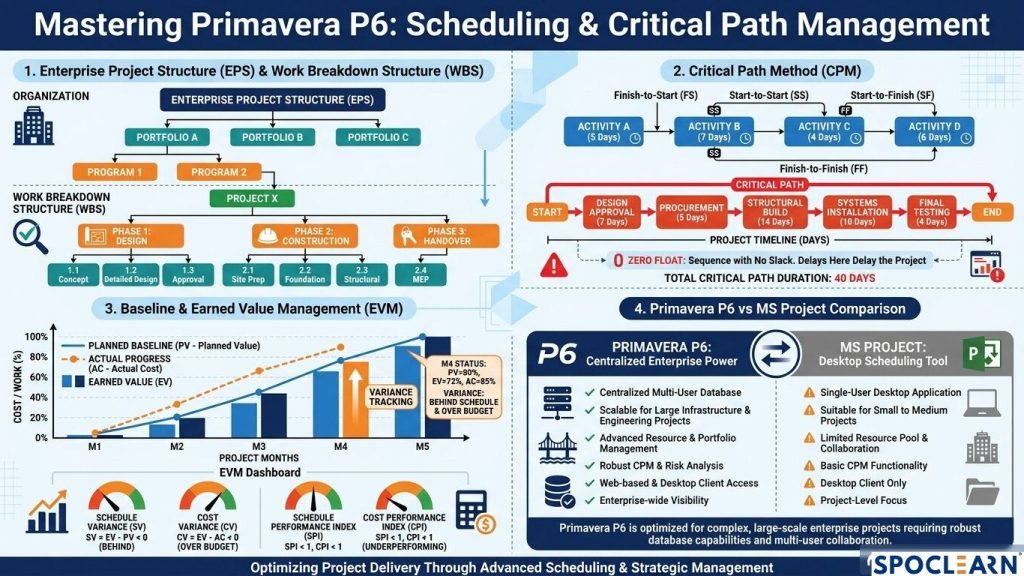
To ensure that large-scale projects are completed on time and within budget, planning teams utilize enterprise project scheduling software such as Oracle Primavera P6. This is what it involves.
Step 1: Creating the project structure
Before introducing activities, it is important to have a clear basis for the activities. Primavera P6 has two hierarchies that define the project’s scope.
Enterprise Project Structure: The upper-level organizational structure whereby projects are grouped by business unit, division, geography, etc.
Work Breakdown Structure: A deliverable-based breakdown, which means dividing the project into manageable and reportable areas.
One of the most common rookie mistakes is using Primavera P6 like Excel and entering a flat list of activities. A properly developed WBS makes it easier to track progress, reporting, filtering and creating reports.
Step 2: Identify activity relationships and calculate the critical path
Following the organization of activities under the various WBS elements, the relationship between these activities must be defined without manually inputting start and finish dates. In Primavera, there are four main types of relations that can be used:
- Finish-to-Start – A successor activity can begin only after the previous activity has been completed.
- Start-to-Start – A successor activity can be initiated only after the previous activity has started.
- Finish-to-Finish—A successor activity can be completed only after the predecessor is completed.
- Start-to-Finish—A successor activity can be completed only after the predecessor starts.
Once all the relationships have been established in Primavera, the software will calculate the schedule using the Critical Path Method (CPM). The critical path is usually the longest path of activities that have no float. Hence, if any activity on this path is delayed, the entire project will also be delayed without intervention.
Step 3: Establish a baseline and monitor progress
It is impossible to assess performance accurately without an approved baseline.
Establish the baseline: After the first schedule is approved, save it as the project baseline.
Monitor progress: Enter the actual start date, remaining duration, percentage of completion, and other relevant data.
Evaluate discrepancies: Compare the existing program against the established baseline to identify discrepancies, schedule breaches, and potential hazards.
Comparing cost-intensive programs enables one to apply Earned Value Management (EVM) and conduct efficiency assessments.
Which tool is suitable for a project depends on how complex the project is, how many people are working on it, and what the organization needs.
Primavera P6 vs MS Project
| Key Features | Oracle Primavera P6 | Microsoft Project |
| Database structure | Oracle Primavera P6 has a centralized, multi-user database that is ideal for a large number of projects. | Microsoft Project is available as a desktop and online tool and is well suited to individual project managers and smaller teams |
| Handling more than one project | Oracle Primavera P6 is useful for managing and visualizing many projects in various ways. | Microsoft Project can also manage multiple projects |
| Baseline management | Oracle Primavera P6 has excellent capabilities when managing multiple baselines. | Microsoft Project provides baseline support too. |
| Common application area of the system | Oracle Primavera is suitable for many industries, including construction, oil and gas, energy, transportation, and heavy engineering. | Microsoft Project is widely used across industries including IT, professional services, marketing, manufacturing, and construction |
Develop Practical Skills With Primavera P6 tutorial
In India, the need for planning and project-control specialists is high, especially within the EPC, infrastructure, construction, and power sectors.
Spoclearn provides practical Primavera P6 training globally. Training is delivered through live, instructor-led online sessions and is also available in cities including New York, London, Bengaluru, Tokyo, and other top cities worldwide. Training consists of 16 hours of class time and covers practical WBS formation, CPM analysis, resource planning, and baseline control.
Take control of your project management strategy by enrolling in the Spoclearn Primavera P6 course.
Frequently Asked Questions
What’s the importance of critical path in Primavera P6?
The critical path outlines operations that affect the project end date and helps project managers prioritize monitoring activities and allocate necessary resources.
Primavera P6 vs MS Project: which software is preferred for beginners?
MS Project is more efficient for smaller-scale projects. Primavera P6 is widely used in large-scale construction and engineering projects.
Why is it crucial to have a baseline in the project before tracking progress?
The baseline records the approved plan, without which one cannot truly track schedule deviations and how well the project is progressing compared to the original plan.