


Power Query has become one of the most essential tools inside Microsoft Power BI for data preparation, transformation, and automation. Modern organizations depend on Power Query to clean messy datasets, combine multiple sources, and build reliable dashboards faster. However, many data analysts still struggle with refresh failures, slow performance, incorrect joins, broken queries, and unexpected data errors.
According to Microsoft Learn and current Power BI optimization guidance, poor query structure, incorrect data types, and inefficient transformations remain some of the biggest causes of report instability and refresh failures in enterprise environments.
This guide explains the most common real-world Power Query problems, why they happen, and how professional data analysts solve them efficiently in 2026.
Why Power Query Matters in Modern Analytics
Before organizations visualize data, they first need clean, structured, and trusted datasets. That is exactly where Power Query becomes critical.
Data analysts use Power Query to:
- Merge Excel, SQL, API, and cloud datasets
- Remove duplicates and null values
- Automate repetitive transformations
- Improve data quality
- Reduce manual reporting work
- Build scalable ETL workflows
Microsoft’s latest PL-300 learning path strongly emphasizes “Prepare the Data” because data preparation now accounts for a major portion of real-world Power BI projects.
Common Power Query Problems Faced by Data Analysts
1. Incorrect Data Type Detection
One of the most frustrating Power Query issues happens when numbers suddenly appear as text or decimal values get truncated.
Why This Happens
Power Query infers data types using the first 200 rows of data. If the first rows differ from later records, Power Query may assign the wrong type automatically.
Real-World Example
A sales dataset contains:
- First 200 rows → whole numbers
- Remaining rows → decimal revenue values
Power Query may automatically assign:
- Whole Number instead of Decimal Number
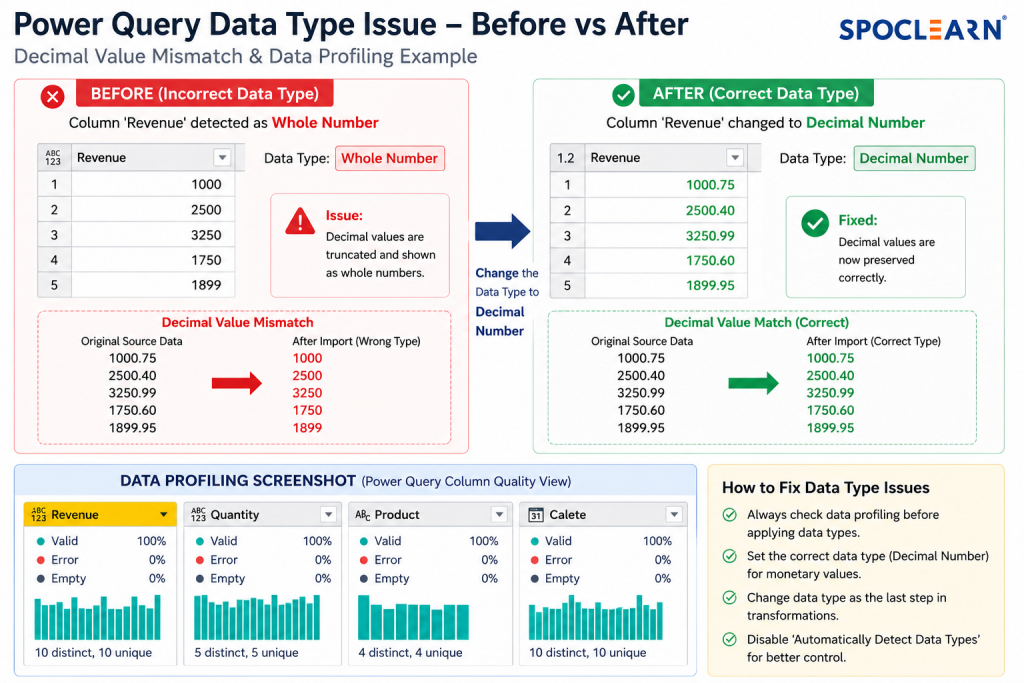
As a result:
- Revenue values become inaccurate
- Financial dashboards show incorrect totals
Solution
Best Practices
- Disable automatic type detection when importing unstable datasets
- Explicitly assign data types manually
- Validate column profiling before publishing reports
Recommended Workflow
- Remove unnecessary rows first
- Clean invalid records
- Assign data types at the final transformation stage
2. Query Refresh Failures
Refresh failures are among the most searched Power BI issues globally.
Common Error Messages
- “Data source access denied”
- “Column not found”
- “Expression.Error”
- “OLE DB or ODBC error”
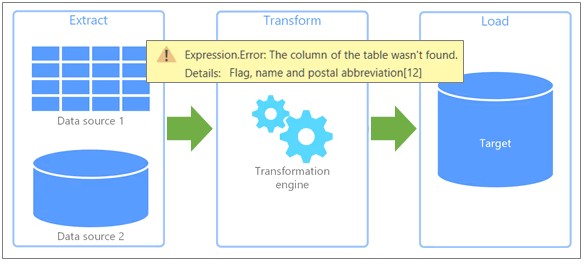
Source: Handling data source errors (Power Query)
These issues often occur when:
- Source files move
- Column names change
- Database permissions expire
- APIs return inconsistent structures
Microsoft notes that renamed columns and modified source structures frequently break refresh operations.
Source: Dealing with errors in Power Query
Solution
What Professional Analysts Do
- Avoid hardcoded file paths
- Use parameters for dynamic sources
- Validate schema consistency
- Add error handling logic
Use TRY Functions in Power Query
Power Query supports error-catching logic using:

Microsoft officially recommends using structured error handling to avoid refresh failures in enterprise pipelines.
3. Slow Power Query Performance
As datasets grow larger, Power Query performance often becomes a bottleneck.
Organizations processing millions of rows frequently experience:
- Slow refresh times
- Frozen Power BI Desktop sessions
- High memory usage
- Delayed dashboards
Recent optimization research and Microsoft guidance show that inefficient transformations and broken query folding are major causes of poor performance.
What is Query Folding?
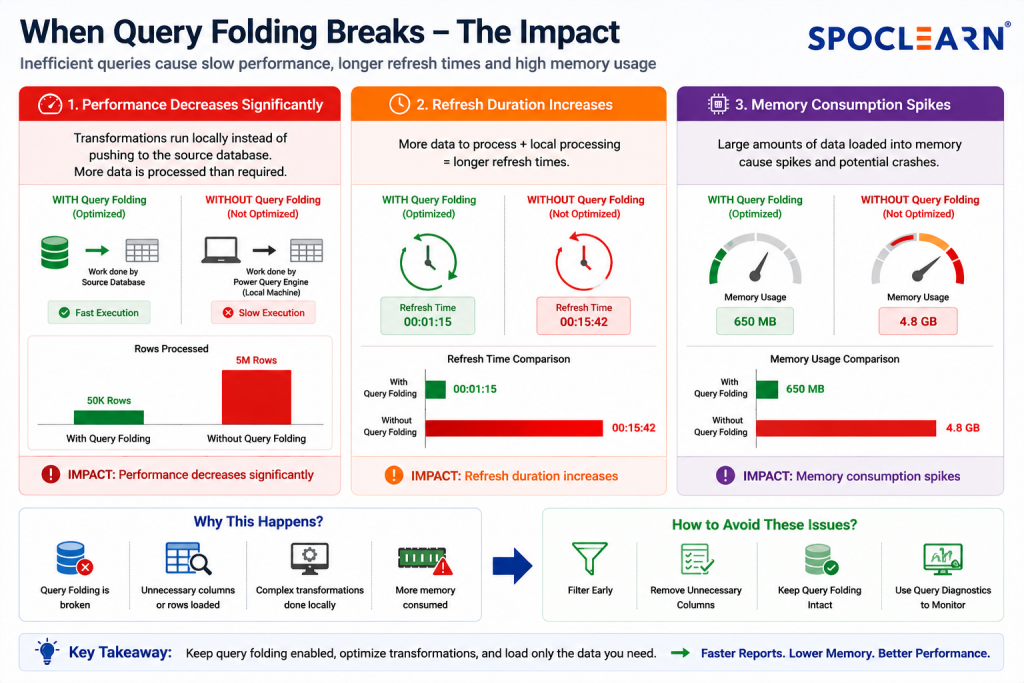
Query folding allows Power Query to push transformations back to the source database instead of processing everything locally.
When query folding breaks:
- Performance decreases significantly
- Refresh duration increases
- Memory consumption spikes
Solution
Best Practices for Faster Queries
Filter Early
Remove unnecessary rows at the beginning.
Remove Unused Columns
Carrying extra columns increases memory usage.
Avoid Complex Nested Transformations
Break transformations into logical steps.
Use Query Diagnostics
Microsoft recommends Query Diagnostics for identifying bottlenecks during refresh operations.
4. Merge & Join Errors in Power Query
Many analysts struggle when merging large datasets.
Common Problems
- Duplicate rows
- Missing matches
- Performance degradation
- Incorrect join relationships
Large joins become resource-intensive when tables contain millions of records.
Solution
Optimize Before Joining
- Filter unnecessary rows first
- Standardize column formats
- Trim spaces and clean text values
Use Correct Join Types
- Inner Join
- Left Outer Join
- Right Outer Join
- Anti Join
Choosing the wrong join type often creates duplicate records and incorrect KPIs.
5. Memory & Resource Limitations
Power BI Desktop may crash or slow down when:
- Models become too large
- Queries load unnecessary columns
- Analysts use excessive calculated columns
Industry experts consistently recommend reducing model size and avoiding unnecessary transformations.
Solution
Reduce Model Size
- Remove unused columns
- Disable unnecessary auto date tables
- Avoid importing historical data unnecessarily
Prefer Measures Over Calculated Columns
Measures consume less memory and improve scalability.
6. Data Source Connection Issues
Modern organizations connect Power BI to:
- SQL Server
- APIs
- SharePoint
- Excel
- Snowflake
- Databricks
- Cloud storage systems
Connection issues usually occur because of:
- Authentication failures
- Gateway problems
- API throttling
- Network interruptions
Solution
Recommended Approach
- Use enterprise gateways
- Refresh credentials regularly
- Avoid personal/local file dependencies
- Monitor API limits
7. Broken Incremental Refresh
Incremental refresh is critical for large enterprise datasets.
However, many analysts incorrectly configure:
- Date filters
- RangeStart parameters
- RangeEnd parameters
This often causes:
- Full refresh instead of incremental refresh
- Increased refresh costs
- Longer refresh windows
Solution
Best Practice
- Validate date columns before publishing
- Use proper datetime formats
- Test refresh behavior with smaller partitions first
8. Poor Data Cleaning Practices
Messy datasets create:
- Duplicate records
- Null values
- Inconsistent categories
- Reporting inaccuracies
Data quality problems directly impact executive dashboards and business decisions.
Solution
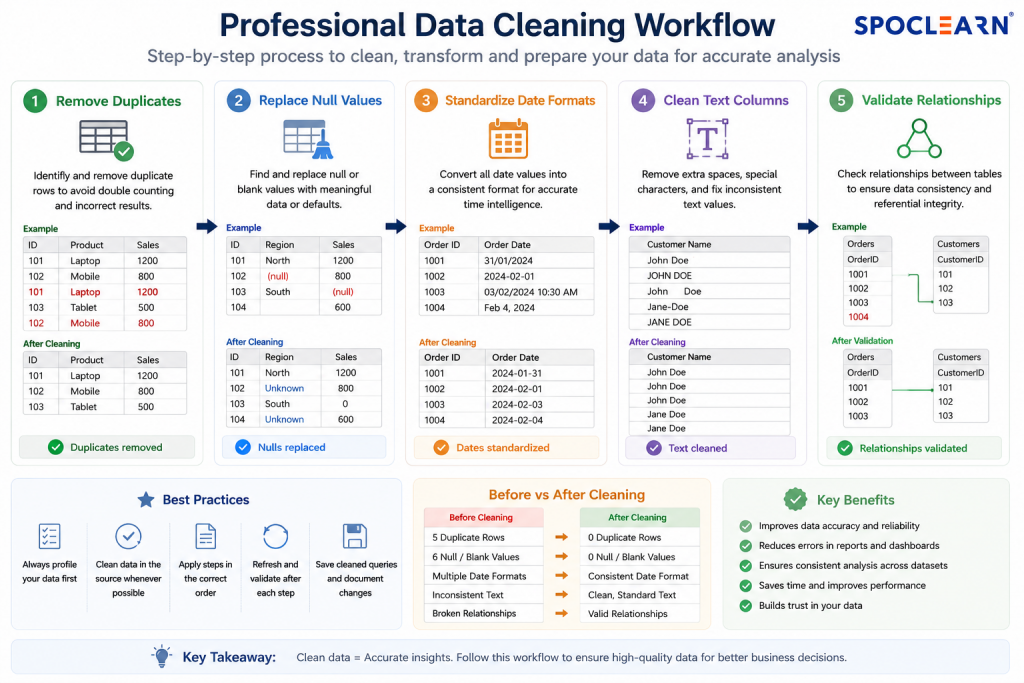
Standard Cleaning Checklist
✔ Remove duplicates
✔ Replace null values
✔ Standardize date formats
✔ Clean text columns
✔ Validate relationships
Power Query Best Practices for Data Analysts in 2026
Follow a Structured ETL Workflow
Recommended Sequence
- Import data
- Filter rows
- Remove unused columns
- Clean values
- Apply transformations
- Assign final data types
Use Query Diagnostics Regularly
Query Diagnostics helps analysts:
- Identify bottlenecks
- Detect slow queries
- Understand refresh operations

Source: Query Diagnostics
Microsoft recommends using diagnostics tools for enterprise-scale Power BI optimization.
Keep Transformations Modula
Instead of one massive query:
- Break transformations into stages
- Use reference queries
- Reuse logic efficiently
Avoid Loading Intermediate Queries
Disable unnecessary query loading to reduce model size and refresh time.
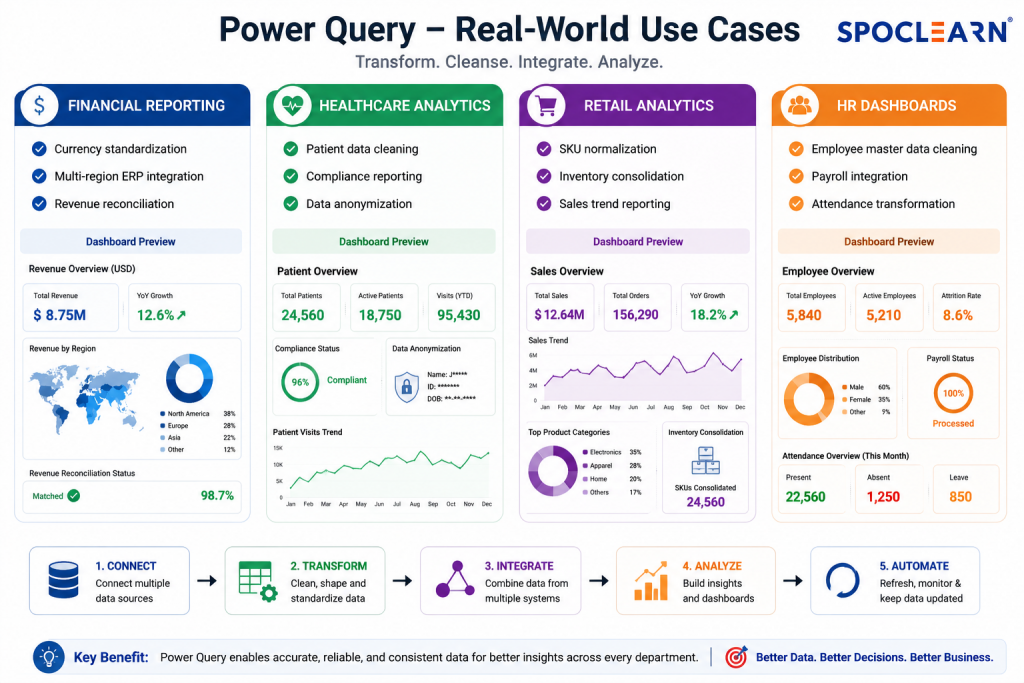
Real-World Power Query Use Cases
Why Power Query Skills Are in High Demand
The demand for Power BI professionals continues to grow globally because organizations increasingly depend on data-driven decisions.
According to Microsoft’s official certification resources, PL-300 focuses heavily on:
- Data preparation
- Modeling
- Visualization
- Query optimization
Modern employers now expect analysts to:
- Clean data efficiently
- Optimize transformations
- Troubleshoot Power Query errors
- Build scalable reporting pipelines
FAQs
1. What are the most common Power Query errors in Power BI?
The most common Power Query errors include refresh failures, incorrect data type detection, merge conflicts, missing columns, and performance slowdowns. These issues usually occur because of inconsistent source data, schema changes, broken query folding, or inefficient transformation steps inside Power BI.
2. Why is my Power BI refresh failing in Power Query?
Power BI refresh failures often happen when file paths change, credentials expire, APIs return inconsistent data, or source columns are renamed. Using dynamic parameters, proper error handling, and validating schema consistency can significantly reduce refresh-related problems in Power Query workflows.
3. How can I improve Power Query performance in Power BI?
To improve Power Query performance, filter unnecessary rows early, remove unused columns, maintain query folding, and avoid complex nested transformations. Using Query Diagnostics and optimizing data models also helps reduce refresh duration and improves overall Power BI dashboard performance significantly.
4. What is query folding in Power Query and why is it important?
Query folding allows Power Query to push transformations back to the original data source instead of processing everything locally. Proper query folding improves refresh speed, reduces memory usage, and enhances scalability when working with large enterprise datasets inside Microsoft Power BI environments.
5. Is PL-300 certification useful for learning Power Query and Power BI?
Yes, the Microsoft PL-300 Certification is highly valuable for professionals working with Power BI and Power Query. It covers data preparation, transformation, visualization, modeling, and optimization skills that organizations actively seek in modern data analysts and business intelligence professionals globally.
6. What are the best Power Query practices for data analysts in 2026?
The best Power Query practices in 2026 include filtering data early, removing unnecessary columns, maintaining query folding, using structured ETL workflows, applying proper error handling, and optimizing refresh performance. Data analysts should also use Query Diagnostics and scalable transformation methods to improve reporting accuracy and dashboard efficiency in Microsoft Power BI.
Conclusion
Power Query remains one of the most valuable tools for modern data analysts using Microsoft Power BI. Yet many professionals still struggle with refresh failures, performance bottlenecks, broken joins, and inconsistent data quality.
The good news is that most Power Query issues become manageable once analysts understand:
- Query folding
- Error handling
- Performance optimization
- Proper ETL structure
- Scalable transformation practices
As organizations continue investing in analytics, professionals with strong Power Query expertise will remain highly valuable across finance, healthcare, retail, manufacturing, and enterprise IT environments.
For professionals planning to validate their analytics skills, the Microsoft PL-300 Certification has become one of the most recognized credentials globally for data analysts and business intelligence professionals. Microsoft’s latest PL-300 study paths now place significant emphasis on data preparation, transformation, and optimization skills because real-world reporting environments demand analysts who can solve complex Power Query problems efficiently.