


Introduction
Excel has been the world’s most trusted business productivity tool for decades. From finance teams preparing monthly reports to HR teams managing employee data and operations teams tracking performance, Excel remains at the center of everyday decision-making. But in 2026, the way professionals use Excel is changing fast. The biggest shift is not just formulas, charts, or pivot tables. It is the move from manual spreadsheet work to automated, repeatable, and AI-supported data workflows.
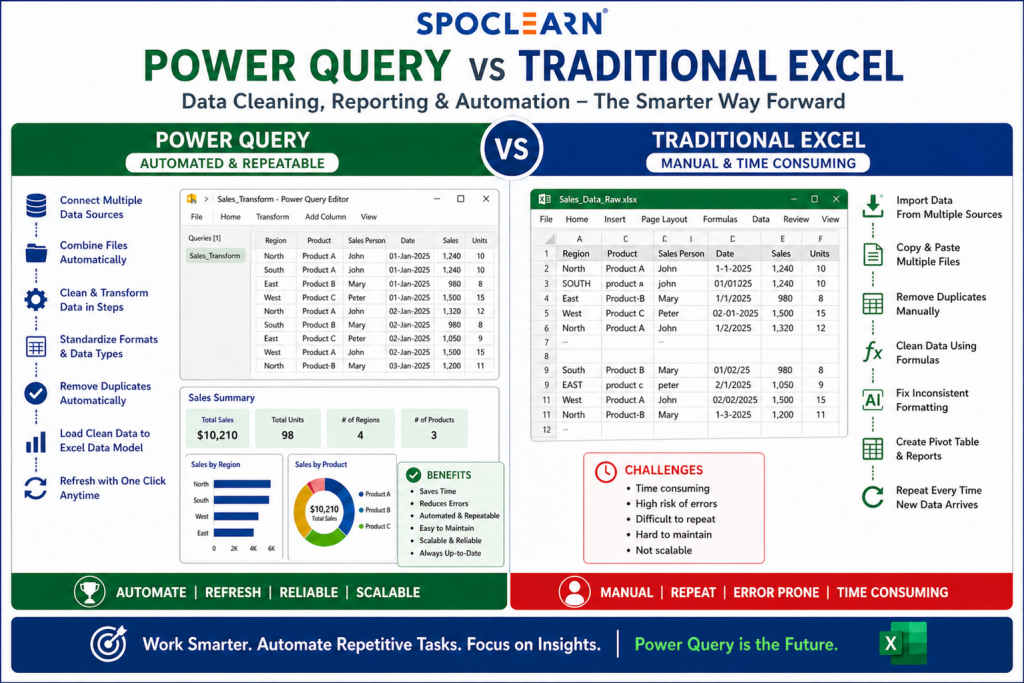
This is where Power Query in Excel becomes important. Traditional Excel is excellent for quick calculations, small reports, formatting, and flexible analysis. Power Query, on the other hand, is built for importing, cleaning, transforming, combining, and refreshing data with far less manual effort. Microsoft describes Power Query as a tool that helps users import or connect to external data, shape it, and refresh it to keep reports updated.
In 2026 and beyond, professionals who know only basic Excel may still complete tasks, but professionals who understand Excel automation, Power Query, dashboards, and AI-powered Excel features will work faster and deliver more reliable business insights.
What Is Traditional Excel?
Traditional Excel refers to the familiar way most users work with spreadsheets. It includes entering data manually, using formulas, creating pivot tables, applying filters, building charts, formatting reports, and correcting errors directly inside worksheets.
For example, a sales executive may download a monthly sales report, remove blank rows, correct product names, split customer details into columns, apply formulas, and create a pivot table. This method works well when the data is small and the task is occasional. However, when the same task must be repeated every week or month, traditional Excel becomes time-consuming and error-prone.
Common traditional Excel tools include:
| Traditional Excel Tool | Common Use |
|---|---|
| Formulas | Calculations, lookups, conditions |
| Pivot Tables | Summarizing data |
| Filters | Sorting and narrowing records |
| Charts | Visual reporting |
| Conditional Formatting | Highlighting trends or issues |
| Manual Copy-Paste | Combining data from files |
| Text to Columns | Splitting values |
| Remove Duplicates | Cleaning repeated entries |
Traditional Excel is still powerful, but its biggest limitation is that many tasks depend on manual steps.
What Is Power Query in Excel?
Power Query is Excel’s data transformation engine. It helps users connect to data sources, clean messy information, combine files, reshape tables, and refresh the output whenever source data changes. Microsoft also confirms that Power Query is available across Excel for Windows, Mac, and Excel for the web.
Power Query is especially useful when you deal with repeated reporting tasks. For example, instead of manually cleaning 12 monthly CSV files, you can create one query that imports all files from a folder, removes unnecessary columns, fixes data types, merges tables, and loads a clean report into Excel.
Microsoft’s January 2026 Excel update also made the full Power Query experience generally available in Excel for the web, including the import wizard and Power Query Editor. This matters because more teams now work in cloud-based environments and need browser-based reporting access.
Power Query vs Traditional Excel: Key Differences
| Comparison Area | Traditional Excel | Power Query |
|---|---|---|
| Best For | Quick calculations and flexible analysis | Repeated data cleaning and automation |
| Skill Requirement | Beginner to advanced formulas | Data transformation thinking |
| Manual Work | High for repeated tasks | Low after setup |
| Error Risk | Higher due to copy-paste and manual edits | Lower because steps are recorded |
| Refresh Capability | Often manual | Refreshable with saved transformations |
| Data Volume | Suitable for small to medium datasets | Better for larger and structured datasets |
| Combining Files | Manual copy-paste or formulas | Automated folder/file combination |
| Audit Trail | Hard to track manual edits | Applied steps show transformation history |
| Enterprise Use | Useful for ad-hoc reporting | Strong for recurring business reporting |
The key difference is simple: Traditional Excel helps you work on data. Power Query helps you build a repeatable data process.
Why Power Query Matters More in 2026
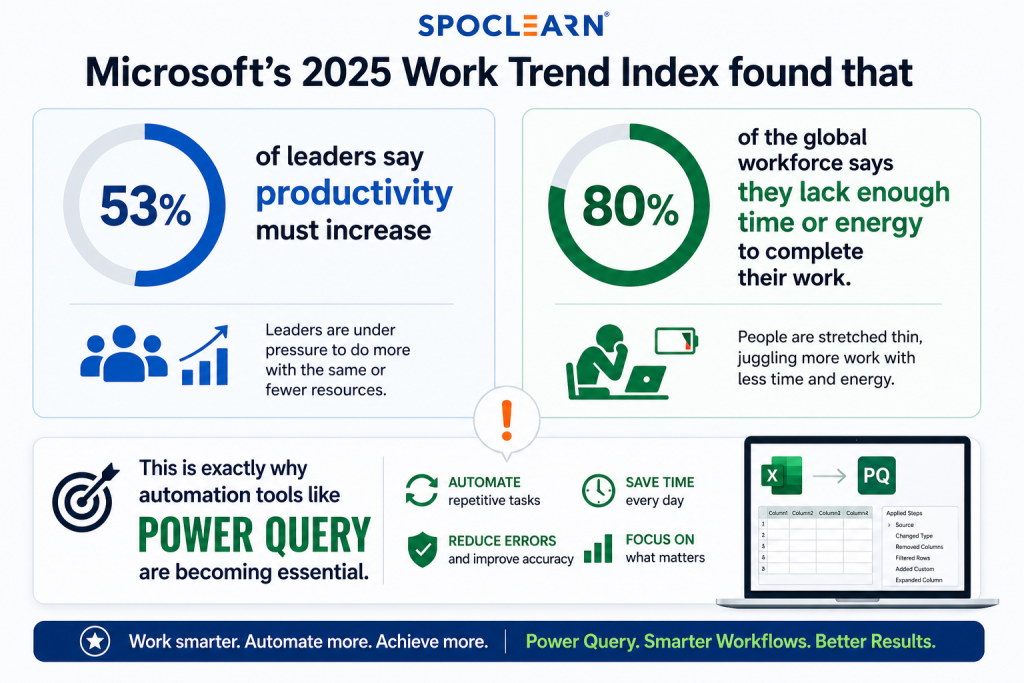
The modern workplace is facing a productivity gap. Microsoft’s 2025 Work Trend Index found that 53% of leaders say productivity must increase, while 80% of the global workforce says they lack enough time or energy to complete their work. This is exactly why automation tools like Power Query are becoming essential.
Source: Power Query for smarter workflows
Professionals are no longer expected to simply prepare reports. They are expected to deliver faster insights, reduce errors, and support business decisions with clean data. In many companies, teams still spend hours cleaning raw exports from ERP, CRM, HRMS, finance systems, Google Analytics, Salesforce, SAP, or internal databases. Power Query helps reduce this repetitive effort.
For example, a finance analyst who manually prepares a monthly expense report may spend 3–4 hours cleaning files. With Power Query, the same process can be converted into a refreshable workflow. The next month, the analyst only replaces the source file and clicks refresh.
Source: Microsoft announced new Edit with Copilot capabilities in Excel
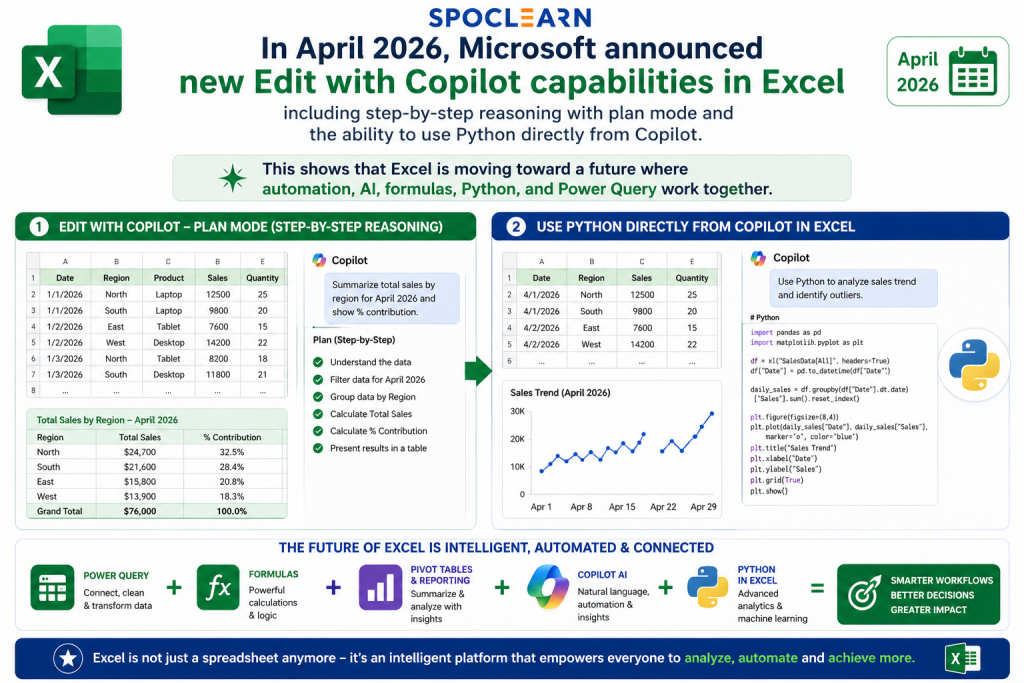
Microsoft also continues to expand Excel with AI features. In April 2026, Microsoft announced new Edit with Copilot capabilities in Excel, including step-by-step reasoning with plan mode and the ability to use Python directly from Copilot. This shows that Excel is moving toward a future where automation, AI, formulas, Python, and Power Query work together.
Practical Example: Sales Report Cleaning
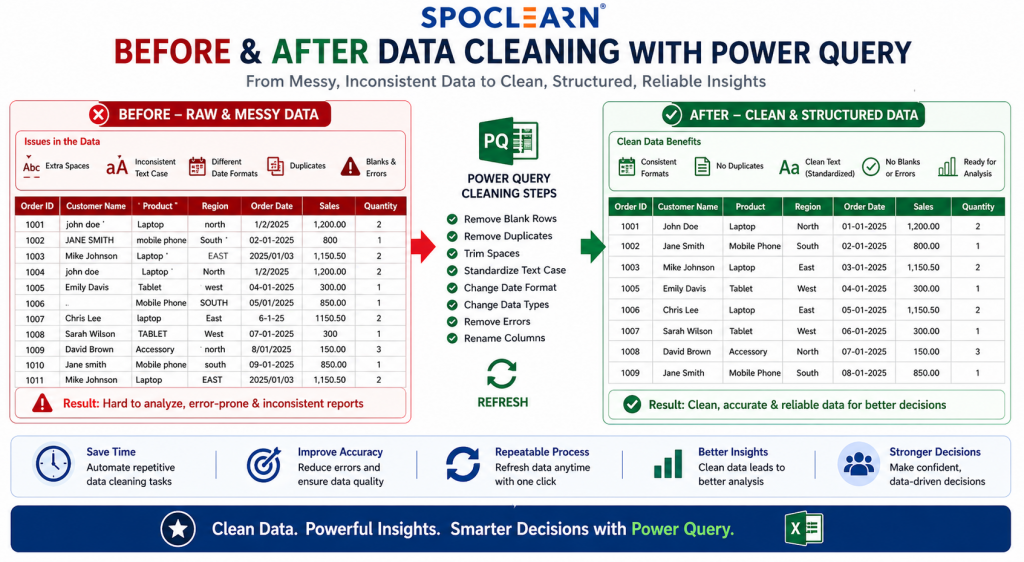
Imagine a company receives weekly sales data from five regional offices. Each file has similar data but different formatting issues.
Common problems include:
| Issue | Traditional Excel Approach | Power Query Solution |
|---|---|---|
| Extra blank rows | Manually delete rows | Remove blank rows step |
| Different date formats | Correct manually or use formulas | Change data type to Date |
| Product names with spaces | Use TRIM formula | Apply Trim transformation |
| Multiple files | Copy-paste into one workbook | Connect to folder and combine files |
| Wrong column order | Rearrange manually | Reorder columns once |
| Duplicate records | Use Remove Duplicates manually | Apply Remove Duplicates step |
| Monthly update | Repeat all steps | Click Refresh |
This example shows why Power Query is not just a technical feature. It solves a real business problem: repeated reporting fatigue.
Where Traditional Excel Still Wins
Power Query is powerful, but it does not replace every part of Excel. Traditional Excel remains better for quick analysis, one-time calculations, formatting, interactive modeling, and financial assumptions.
Traditional Excel is ideal when:
- You need a quick calculation or estimate.
- You are building a simple budget or tracker.
- You want to test formulas quickly.
- You need flexible what-if analysis.
- You are creating a highly formatted report for presentation.
- You are working with small data that does not require automation.
For example, if a manager wants to calculate quarterly growth percentage, a simple Excel formula is faster than building a Power Query workflow. Similarly, if a finance team is preparing a custom financial model, traditional formulas, scenarios, and assumptions are still essential.
The future is not Power Query instead of Excel. The future is Power Query plus Excel.
Where Power Query Wins
Power Query becomes the better choice when the task is repeated, messy, or data-heavy.
Power Query is ideal when:
- You receive similar files every week or month.
- You need to clean large datasets.
- You combine data from multiple sources.
- You want to reduce manual copy-paste.
- You need consistent data transformation steps.
- You want reports that refresh automatically.
- You work with CSV, databases, folders, web data, or ERP exports.
Microsoft notes that Power Query automatically applies transformations after they are created, which means users can build a query once and run it whenever needed. This is one of the biggest reasons enterprises are adopting Power Query for recurring reporting.
Power Query and AI: The Future of Excel Automation
The future of Excel is not just formulas. It is becoming a combination of:
| Capability | Business Value |
|---|---|
| Power Query | Cleans and prepares data |
| Pivot Tables | Summarizes information |
| Power Pivot | Builds data models |
| Excel Copilot | Helps analyze, explain, and edit workbooks |
| Python in Excel | Supports advanced analytics |
| Office Scripts | Automates workbook actions |
| Dashboards | Communicates insights visually |
Microsoft’s February 2026 Excel update expanded Agent Mode in Excel and added the ability to query local Excel files with Copilot Chat. This shows that Excel is becoming more intelligent, but clean data is still the foundation. AI can suggest insights, but if the data is inconsistent, incomplete, or duplicated, the output will still be unreliable.
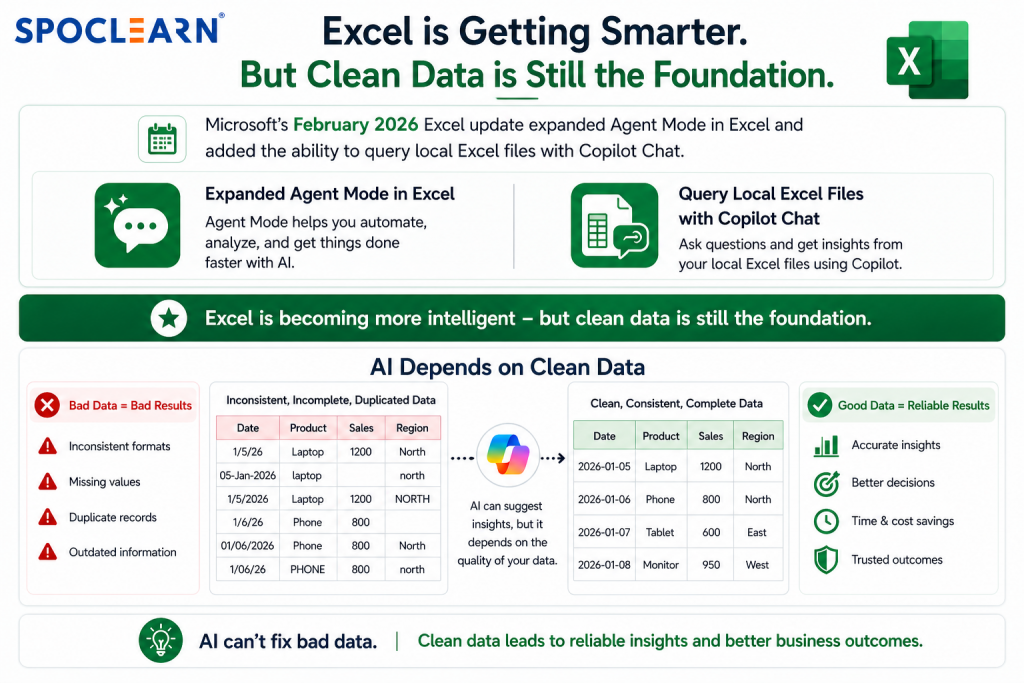
Source: Microsoft’s February 2026 Excel update
As Microsoft CEO Satya Nadella said, AI technologies can act as a “co-pilot” to help people “do more with less.” In Excel, Power Query plays the foundation role by preparing clean data before AI, dashboards, and reports generate value.
Industry Use Cases of Power Query
| Industry | Power Query Use Case |
|---|---|
| Finance | Monthly expense consolidation, invoice cleaning, budget variance reporting |
| HR | Employee master data cleaning, attendance reports, payroll preparation |
| Sales | CRM exports, regional sales consolidation, target vs achievement reports |
| Marketing | Campaign data cleaning, lead source tracking, Google Analytics exports |
| Supply Chain | Inventory reports, vendor performance tracking, shipment data cleaning |
| Healthcare | Patient service data, compliance logs, operational dashboards |
| Education | Student records, attendance tracking, training completion reports |
| IT | Ticket data analysis, asset inventory reporting, SLA dashboards |
Across sectors, the use case remains similar: raw data comes from different systems, Power Query cleans it, and Excel turns it into usable insights.
Traditional Excel Problems That Power Query Solves
Many working professionals search for Excel help because they face the same problems again and again.
1. “My Excel report takes too much time every month.”
Power Query solution: Build a repeatable query and refresh it every reporting cycle.
2. “My data has extra spaces, blanks, and duplicates.”
Power Query solution: Use Trim, Clean, Remove Blank Rows, and Remove Duplicates transformations.
3. “I receive multiple files from different teams.”
Power Query solution: Use the From Folder connector to combine files automatically.
4. “My formulas break when new rows are added.”
Power Query solution: Load cleaned data into structured tables and refresh the output.
5. “My dashboard numbers change because source data is inconsistent.”
Power Query solution: Standardize data types, column names, categories, and formats before analysis.
These practical solutions make Power Query one of the most valuable Excel skills for 2026.
Power Query vs Traditional Excel: Which One Should You Learn First?
For beginners, traditional Excel should come first. Users need to understand tables, basic formulas, filters, charts, and pivot tables before moving into automation. However, once a professional starts working with recurring reports, Power Query becomes essential.
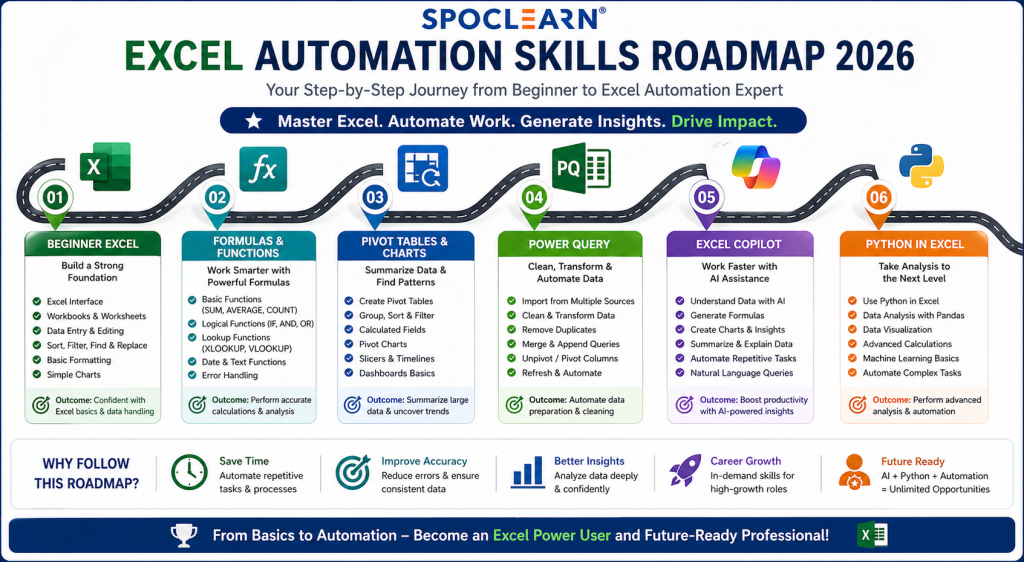
A strong learning path could look like this:
| Stage | Skills to Learn |
|---|---|
| Beginner | Tables, filters, sorting, basic formulas |
| Intermediate | XLOOKUP, IF, SUMIFS, pivot tables, charts |
| Advanced | Power Query, dashboards, data validation |
| Professional | Power Pivot, DAX basics, Office Scripts, Copilot |
| Future-Ready | AI in Excel, Python in Excel, automated reporting |
This learning path is useful for finance professionals, analysts, HR teams, project coordinators, managers, entrepreneurs, and enterprise reporting teams.
Benefits of Power Query for Enterprises
Enterprises need consistent, reliable, and scalable reporting. Manual Excel work can create hidden risks, especially when business decisions depend on spreadsheets.
Key enterprise benefits include:
| Benefit | Business Impact |
|---|---|
| Reduced manual effort | Saves reporting time every week or month |
| Better data quality | Reduces duplicate, incorrect, or inconsistent records |
| Faster reporting cycles | Teams can refresh instead of rebuild |
| Improved governance | Applied steps create a visible transformation trail |
| Higher productivity | Analysts spend more time on insights, not cleaning |
| Scalable reporting | Works across departments and recurring data sources |
| Better AI readiness | Clean data improves Copilot and dashboard outputs |
The rise of large-scale Copilot deployments also shows how enterprises are investing in AI productivity. Reuters reported in April 2026 that Microsoft is deploying Copilot to about 743,000 Accenture employees, one of its largest enterprise deployments. As AI adoption grows, clean and structured Excel data will become even more important.
Best Practices for Using Power Query in 2026
To get the best results from Power Query, users should follow a few practical rules.
| Best Practice | Why It Matters |
|---|---|
| Use proper source files | Avoids broken queries |
| Keep column names consistent | Makes refresh smooth |
| Avoid unnecessary manual edits after loading | Keeps automation reliable |
| Rename applied steps clearly | Helps future users understand the workflow |
| Check data types early | Prevents calculation and date errors |
| Use folders for recurring files | Simplifies monthly or weekly consolidation |
| Document the process | Supports team handover |
| Combine Power Query with Pivot Tables | Converts clean data into fast insights |
Power Query is not difficult, but it requires a process mindset. Instead of asking, “How do I fix this spreadsheet today?” users should ask, “How do I build a workflow that fixes this every time?”
FAQs
1. Is Power Query better than traditional Excel?
Power Query is better for repeated data cleaning, combining files, transforming reports, and automating recurring tasks. Traditional Excel is better for quick calculations, flexible analysis, formulas, and custom formatting. Most professionals should learn both because Power Query prepares the data, while traditional Excel helps analyze and present it.
2. Can Power Query replace Excel formulas?
Power Query cannot fully replace Excel formulas. It reduces the need for many cleaning formulas such as TRIM, CLEAN, LEFT, RIGHT, and manual lookup preparation. However, formulas are still important for calculations, models, dashboards, and business logic. The best approach is to use Power Query for cleaning and formulas for analysis.
3. Is Power Query useful for beginners?
Yes, Power Query is useful for beginners once they understand basic Excel tables and data structure. It has a visual interface, so users do not need to write code for most tasks. Beginners can start with simple actions like removing columns, filtering rows, changing data types, and combining files.
4. Why do companies use Power Query?
Companies use Power Query to save time, reduce manual errors, standardize reporting, and automate recurring data preparation. It is especially useful for finance, HR, sales, operations, supply chain, and project reporting teams that work with regular exports from business systems.
5. Is Power Query important for Excel jobs in 2026?
Yes, Power Query is becoming an important Excel skill for 2026 because employers want professionals who can clean data, automate reports, and support faster decision-making. Job roles in analytics, finance, operations, HR, project management, and business reporting increasingly prefer advanced Excel, Power Query, dashboards, and automation skills.
Conclusion
As businesses move deeper into AI-powered operations, data automation, and smarter decision-making, Excel is no longer just a spreadsheet tool—it is becoming a core business intelligence platform. In 2026 and beyond, professionals who combine Traditional Excel, Power Query, Excel Automation, Microsoft Copilot, and AI-enhanced reporting will stand out across finance, HR, operations, project management, sales, and enterprise analytics.
For individuals, mastering Advanced Microsoft Excel Training with Power Query, Dashboarding, Advanced Formulas, and Automation means faster problem-solving, stronger productivity, and greater employability in a data-first economy. For enterprises, investing in Excel corporate training programs helps teams reduce manual work, improve reporting accuracy, and build scalable decision-making systems that align with digital transformation goals.
Whether you are a beginner learning formulas or an enterprise team building automated dashboards, the future belongs to those who learn how to turn raw data into business intelligence.